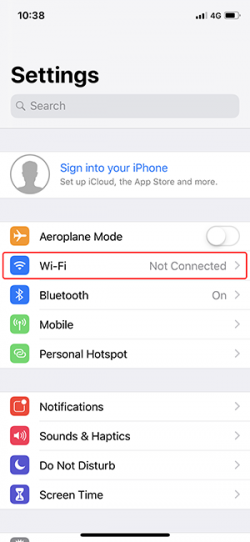
Step 2. Tap Wi-Fi in your settings
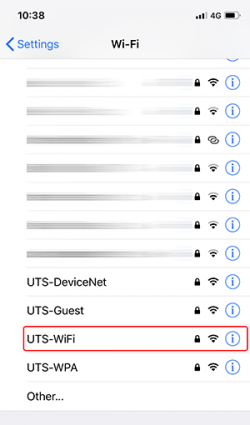
Step 3. Tap UTS-WiFi to select the UTS-WiFi network
Step 4. Enter your UTS student or staff number in the username fieldand your password, for example 12345678 as your user name and your usual IT password.
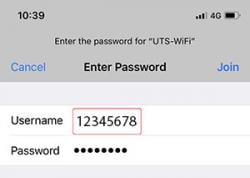
Step 5. Tap Join
Step 6. Tap Trust to trust the certificate
To connect to UTS-WiFi using your iPhone
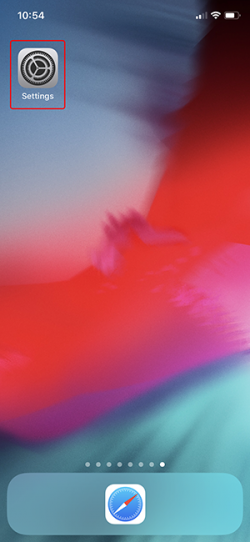
Step 1. Tap the Settings
Step 2. Tap Wi-Fi in your settings
Step 3. Tap UTS-WiFi to select the UTS-WiFi network
Step 4. Enter your UTS student or staff number in the username fieldand your password, for example 12345678 as your user name and your usual IT password.
Step 5. Tap Join
Step 6. Tap Trust to trust the certificate
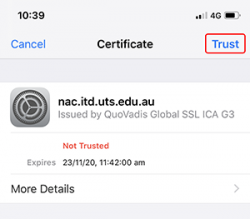
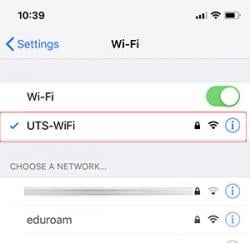
Your phone should now be connected to the UTS-WiFi