

• Posted on 28 Mar 2024
  • 3-minute read
Student typing on computer

As of Wednesday 3 April 2024, the new ServiceConnect is ready for use. 
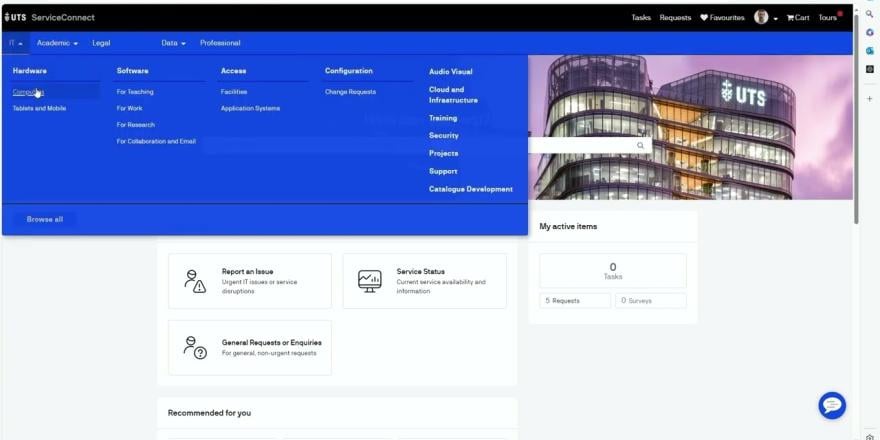
8ugLMhFJIUg

Descriptive transcript

Welcome to Service Connect, our new portal designed to streamline service requests and information access. In this walkthrough, we'll explore the portal's features and how they can benefit you.

Let's start by highlighting some key benefits of Service Connect: an enhanced service catalogue, now more user-friendly; a more intuitive user interface for easier navigation; faster resolution of service issues, adapting quickly to service or system changes; AI-powered search for quick and efficient service access; quick access to a broad range of information, helping you find solutions faster; and targeted feedback through CSAT for services more aligned with your needs.

Now let's dive into the portal. The Service Connect portal is divided into four main areas. The top area includes tasks, requests, favourites, profile information, and interactive tools. Below that is the menu area, where you can find services offered through the portal. The banner area is where you can search for services or knowledge articles. The content area is where you can find recommendations and access frequently used content.

In the top area, you will find tasks, request history, and favourites. Your profile contains personal settings, and the cart holds your ordered items. Interactive tools are available for assistance.

Moving on to the main menu, it's organised to help you find services easily. It's structured based on feedback and varies according to your role, enhancing relevance and accessibility. The banner area is where you can search for the services and knowledge articles you need.

In the content area, you can view quick links and My Active Items, providing fast access to common tasks and pending requests. You can explore popular topics specific to your area.

Lastly, the footer contains essential links, including support and FAQs.

That concludes our walkthrough of the Service Connect portal. We are committed to continually enhancing this portal to meet your needs. Thank you for watching.

The new portal is now available so you can easily access university IT support and services.

How do I access it 

You can access the new ServiceConnect by visiting as you usually would for IT support.

If you require access to update your open tickets please visit . From Wednesday 3 April you can raise new tickets using http://serviceconnect.uts.edu.au

Reminder of what’s new

Improved user interface:  An updated portal to navigate to the IT services that you need.  

Search smarter, not harder: Find what you need with our new search feature. 

Streamlined service requests:  Whether you need help with installing software, sorting out your learning systems, Wi-Fi, email, or multi-factor authentication issues, the process is now smoother than ever. 

Your voice amplified:  Let us know what you think about the new portal through a feedback survey. 

Want to learn more?  

This short video highlights all the features you can now access.  

Any questions? Contact us via the ServiceConnect Program page or by email at serviceconnect-program@uts.edu.au

Share